Know who you're buying for, what you've spent, and what's left, before the holidays get busy.
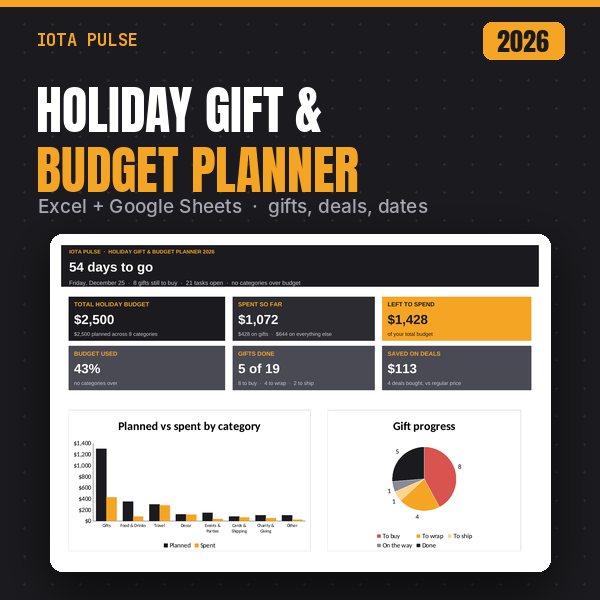
This holiday planner keeps your gift list, your season budget, your Black Friday and Cyber Monday deals and your holiday dates in one spreadsheet. A dashboard counts down to the big day and tells you how much of your budget is left and how many gifts are done. It works in Microsoft Excel and Google Sheets.
What's included (7 tabs)
- Start Here: six quick setup steps and a colour key, so you know where to type.
- Dashboard: a countdown, total budget, spent so far, left to spend, budget used, gifts done (for example "5 of 19") and money saved on deals. It also has a planned vs spent chart for every category, a gift progress chart, gifts by group and your next eight to-dos.
- Budget: set one total for the season and split it across 8 categories: Gifts, Food & Drinks, Travel, Decor, Events & Parties, Cards & Shipping, Charity & Giving and Other. Rename any category except Gifts. Each one shows spent, remaining, % used and a status (On track, Close or Over).
- Gift List: one row per gift, with room for 150. Columns for recipient, group, gift idea, budget, what you paid, Bought, Wrapped, Delivery, store, order or tracking number and ship-by date. Status moves from To buy to To wrap, To ship and Done on its own. Each person's total adds up for you, and a ship-by date turns red once it has passed.
- Other Spending: everything that isn't a gift (groceries for the big meal, flights, decorations, party supplies, cards and stamps), in up to 200 rows with a category dropdown.
- Deals: a Black Friday and Cyber Monday watch list with up to 100 items. Enter the regular and sale price to see what you'd save and the % off. Mark Bought and the saving counts toward "Saved on deals".
- Holiday Calendar: cards, parties, travel, cooking and shipping cutoffs, with up to 100 dated items. Each one shows days left and a status (Upcoming, This week, Overdue or Done).
Every file has
- A dashboard with charts that updates on its own.
- A Start Here tab with setup steps.
- Dropdowns, frozen headers and print-ready pages.
- Example data so you can see it working, easy to clear.
- No macros, add-ins or scripts.
How to use it
- Excel: open the .xlsx file (Excel 2010 or newer, Windows or Mac).
- Google Sheets: upload the .xlsx to Google Drive, open it, then choose File > Save as Google Sheets.
- Start on the Start Here tab. Pale amber cells are where you type, and grey cells calculate on their own.
- Set your total budget and holiday date on the Budget tab, add your gifts, and check the Dashboard as you go.
Good to know
- This is a digital download. Nothing physical ships.
- Gifts are counted from the Gift List and everything else from Other Spending, so nothing is counted twice. Deals are a watch list and don't add to your spending.
- The holiday date is yours to set, so the countdown works for whichever day matters most to you.
- Shipping cutoff dates in the example are placeholders. Carriers publish their own holiday deadlines each year, so check them and update the dates.
- Personal use only. Please don't resell or share the file.
A planning tool, not financial advice. Totals and savings are only as accurate as what you enter. Check store prices, deal terms and carrier deadlines yourself.