Plan all of 2027 in one spreadsheet and see how each month really went.
Set a plan for every month, log what comes in and goes out, and one dashboard shows income, spending, what's left over, savings, debt paid and net worth for the whole year. Savings goals, sinking funds and a bill calendar sit in the same file. It works in Microsoft Excel and Google Sheets.
What's included (11 tabs)
- Start Here: seven setup steps and a colour key, so you know where to type.
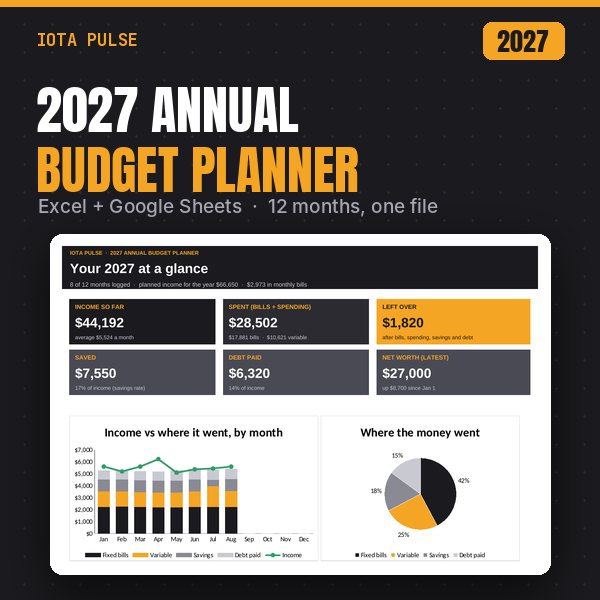
- Dashboard: income so far, spending (bills plus variable), left over, saved (with your savings rate), debt paid and your latest net worth. Four charts: income vs where it went by month, where the money went, left over each month, and net worth by quarter. A month-by-month table covers the whole year.
- Budget Plan: up to 50 categories in five sections (Income, Fixed Bills, Variable Spending, Savings and Debt Payments), with a planned amount for each month. Totals and left over are worked out for every month.
- Transactions: a 2,000-row log. Pick a category and the section and month fill in. A Check column flags a missing category, a missing date or a date from another year. Would rather not log every purchase? Enter one line per category per month instead.
- Actuals: fills itself in. Every category for every month, with the year total, the year plan and the difference.
- Month View: pick any month to see planned vs actual for each line, with a status: On track, Close, Over, Done or Short.
- Savings Goals: up to 15 goals. Enter the target, the target date, what you've saved so far and your monthly contribution. You see % done, what's left, months left and what you need per month, plus On track, Behind or Reached.
- Sinking Funds: up to 15 funds for costs you know are coming (car repairs, holidays, insurance, travel). Each has a suggested monthly amount, a January to December grid, money spent from the fund, the balance and % funded.
- Net Worth: a snapshot on January 1 and at the end of each quarter, for up to 12 assets and 10 debts. Net worth and the change since the last snapshot are worked out for you.
- Bills: up to 30 bills with amount, due day and frequency (monthly, quarterly, every 6 months or yearly), plus what's due in each month.
- Bill Calendar: pick a month to see a calendar with the bills due each day and the total for the month.
Every file has
- A dashboard with charts that updates on its own.
- A Start Here tab with setup steps.
- Dropdowns, frozen headers and print-ready pages.
- Example data so you can see it working, easy to clear.
- No macros, add-ins or scripts.
How to use it
- Excel: open the .xlsx file (Excel 2010 or newer, Windows or Mac).
- Google Sheets: upload the .xlsx to Google Drive, open it, then choose File > Save as Google Sheets.
- Start on the Start Here tab. Pale amber cells are where you type, and grey cells calculate on their own.
- Type your plan on the Budget Plan tab, log money in and out on Transactions, and check the Dashboard each month.
Good to know
- This is a digital download. Nothing physical ships.
- It's set up for January to December 2027. The example data covers January to August 2027 so every chart has something to show. Clear it in a few clicks (the Start Here tab lists the cells).
- Categories are yours to rename, add or delete. The dropdowns and totals follow automatically.
- Want to reuse it later? Change the year on the Budget Plan tab and clear the example data.
- Personal use only. Please don't resell or share the file.
A budgeting and planning tool, not financial, tax or investment advice. Numbers are only as accurate as what you enter. Check balances and due dates with your bank and billers.